By  Best IRS Tax Refund · Last updated
To get a W-2 corrected, ask your employer’s payroll or HR department to issue a Form W-2c (Corrected Wage and Tax Statement). Only the employer can fix it. If they won’t, or the correction doesn’t arrive in time, the IRS can contact them for you, and Form 4852 is your last-resort substitute. The same route works for a W-2 that never arrived. Ask for it to be resent or reissued.
The short version
- Employer first: ask in writing for a W-2c.
- Still nothing at the end of February: call the IRS at 800-829-1040.
- Deadline close: file with Form 4852 and your pay stubs.
- Real form arrives later and differs: amend with Form 1040-X.
Steps to Get a W-2 Corrected
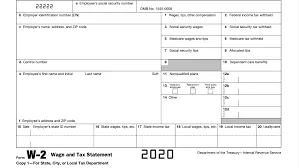
- Confirm it’s really wrong. Compare the W-2 against your last pay stub of the year. Check your name, Social Security number, and the wage and withholding boxes. Our guide to the key numbers on your W-2 shows where mistakes usually hide.
- Contact payroll or HR in writing. Say which box is wrong, what it shows, and what it should show. Attach a pay stub if the dollar amounts are off. An email leaves a record.
- Ask for a W-2c, and ask when. The employer files the W-2c with the Social Security Administration and gives you your copy. Many payroll systems also post it in the employee portal.
- Wait for the corrected form before you file if you can. Filing with a wrong figure often means an amended return later.
- Escalate if nothing happens. See the section below on what to do when your employer won’t fix it.
Not every mistake needs a W-2c. A wrong address, for example, usually doesn’t. The employer can just send you a corrected copy. Errors in your name, SSN or amounts generally do need one.
How long will the W-2c take? No fixed legal turnaround exists for you as the employee. The Social Security Administration’s filing guidance tells employers to send corrections and give employees the W-2c as soon as possible after finding an error. Some payroll systems produce one within days, others take weeks. So ask for a date, and follow up in writing if it slips.
Cost shouldn’t come up. You shouldn’t be charged for a correction, and employers can’t make you pay for your own W-2c. If your payroll provider bills the employer for it, that’s between the two of them.
How to Get a W-2 Resent or Reissued
A lost or missing W-2 is a different problem from a wrong one, but the first move is the same: ask the employer. Check that they have your current mailing address, because a returned envelope is a common culprit. This also applies to a former employer. Contact their payroll or HR department and give them your new address.
Many employers also let you download or reprint the form yourself through a payroll portal. We walk through that in how to get your W-2 form online. If you’re still waiting, see when W-2s usually arrive before you worry.
Employers generally must furnish W-2s by January 31. When that date falls on a weekend, it moves to the next business day. For 2026 wages, that means Monday, February 1, 2027, since January 31, 2027 is a Sunday.
What to Do If Your Employer Won’t Fix It
Start with the employer, and keep a record of your requests. The IRS expects you to try them before it steps in. Then there are two fallbacks.

Call the IRS
If the form is still missing or wrong at the end of February, call 800-829-1040. The IRS will ask the employer to furnish it.

File Form 4852
A substitute for a W-2 or W-2c, filled in from your final pay stub and other records. Expect possible refund delays while the IRS checks it.

Get a transcript
A wage and income transcript shows what your employer reported. It can help you fill in Form 4852.
For the call, have your pay stubs and the employer’s name, address and EIN ready.
If the deadline is close and you still have nothing, you can file with Form 4852. You explain on it how you worked out the figures. Use it as prescribed, with honest estimates. The IRS warns it will challenge anyone who uses the form to avoid tax.
Not having a W-2 doesn’t excuse you from filing, and it doesn’t extend your deadline. If you need more time, request an extension.
Don’t expect the IRS to produce the form itself. It doesn’t issue or fix W-2s, though it can contact your employer for you.
Filing Taxes With a W-2c
A W-2c shows two columns for most boxes: “Previously reported” and “Correct information.” Use the correct information column on your return.
If tax software already imported the old figures, go back and edit them by hand. Before you submit, compare every box on your return with that column. A mismatch is what slows a refund down.
Already filed with the wrong numbers? If the correction changes your income, withholding or tax, you’ll likely need to file an amended return on Form 1040-X. A W-2c that only moves an amount between boxes, with no effect on your tax, generally doesn’t call for one. Wait until the IRS has accepted your original return before amending.
To claim a refund by amending, file within 3 years of the date you filed your original return or 2 years of the date you paid the tax, whichever is later. Corrected wages can also change your refund, so see how your refund is calculated.
E-Filing With a W-2c or Form 4852
You can e-file when you have a W-2c. A substitute is different. Form 4852 normally goes on a paper return that you mail, and some software, TurboTax included, can prepare the form but won’t e-file a return that includes it. Check your software’s current rules before you start. If your estimates turn out wrong once the real W-2 shows up, you’ll need an amended return.
If you’d rather have software guide you through the edits, our page on TurboTax discounts covers ways to lower the cost of filing.
Rules, forms and deadlines change by tax year. Check IRS.gov or talk to a tax professional about your own situation.
Sources
- IRS — Topic no. 154, Form W-2 and Form 1099-R (what to do if incorrect or not received) — Employer first, IRS call at the end of February, Form 4852 as substitute, Form 1040-X if figures differ.
- IRS — When and how to amend a tax return — When an amended return is needed and the 3-year and 2-year refund windows.
- Social Security Administration — 2026 EFW2C filing guidance — Employers should submit corrections and give employees the W-2c as soon as possible.